Verified knowledge for the system you already have.
Sphoton reads your codebase and database schema, drafts what each module does with file:line evidence, and has a human confirm every fact. This is the reference for how that works — concepts first, then each destination, then the parts an agent talks to.
Every section is labelled shipped beta or later and means it. Beta opens September 1, 2026; anything marked beta is documented as designed and may shift before general release.
What Sphoton is #
A desktop application that turns a repository into a set of modules — named pieces of your system, each anchored to real tables, described at three levels of detail, and certified by a human rather than asserted by a model.
It is not a documentation generator, a chat wrapper, or a code editor. Sphoton never writes to your repository. It produces knowledge about the system that stays true as the system moves.
What it does
Analyses code and schema locally · drafts assertions with evidence · scores fidelity honestly · flags gaps · marks knowledge stale when the code changes · serves that knowledge to humans and agents at the depth each needs.
What it doesn't
No repo mirroring or server-side index · no commits, branches, or edits to your code · no invented completeness — a gap is shown as a gap · no server-side ability to read your content.
Who it's for
- Product teams — the primary shape. Shared certified knowledge, roles, two-signature certification. This is the tier we recommend.
- A solo developer owning a whole product — one map, kept honest across months of context switching.
- A developer inside a large team — useful, but you'll still need the team's map to move safely; knowledge is worth most when the whole team certifies into it.
Why it exists — three stories #
Sphoton is built for one problem, and it shows up three different ways in the same company. The marketing site tells these as an animated walk; here they are in short.
Mike — the new hire
Software Engineer III, four days in. Hired for skill, and he has it. What he does not have is the map: which part of this system does what. So he opens files — forty-one tabs by Thursday — and no file tells him which other files care about it. Change the tax rate here and invoices change too; the code never says so. The architecture doc was last updated eleven months ago by someone who has left, and half of it is still true. He cannot tell which half. So he asks, waits three hours, and the answer is a name.
His first solo change ships in week six. Two tests, one review, green. It is reverted the next day — it also touched Notifications, and nothing in the repo told him.
6 weeks before a first solo change · 40% of the system he can explain · 3 people interrupted to teach him. And the next hire pays it again.
Bob — the one who is leaving
Senior engineer, five years, twenty-one days' notice. He knows the system, not the files: which modules talk, what breaks, why that cache exists. Twelve modules only he can explain. So you schedule handover — three sessions, ninety minutes each — and it covers four of the twelve, because handover captures what he remembers to say, not what he knows.
What he does say decays as it is passed on: 100% → 82% → 61% → 44%, and nobody downstream can tell what was dropped. Three months later a locale change double-charges 1,900 invoices. Bob would have caught it in review.
9 days to trace one missed dependency · 4 engineers pulled off the roadmap · 2 hours to actually fix it. You did not lose an engineer; you lost the map.
Alice — the one who explains
Four people asked her four questions this week; two were the same question. That is sixty minutes a day of doubt clearing — not knowledge transfer — from your most expensive engineer.
So she teaches the agent instead: twenty minutes on Payments, and it genuinely understands. The next morning it knows nothing — new chat, empty memory — and overnight five people changed the code, so what it "knew" was already out of date. She explains again, and 91% of the context window is gone before the work starts. One of the five modules she summarised is stale, so the approach is wrong from the first line. It ships, QA finds it, and the whole Dev → QA → BA → Dev → QA cycle runs a second time.
250 hours a year re-answering · 2 weeks of slip on the second lap · 6 roles doing the work twice. Nobody lacked skill — one fact the team already owned was not where it was needed.
Mike, Bob and Alice have the same problem: understanding does not persist. It gets re-learned, re-told and re-typed — and it loses accuracy at every step. Everything in the rest of these docs exists to stop that.
Install & first run beta #
Sphoton ships as a desktop installer. Join the waitlist and your invite carries the download link for your platform — there is no public download and no web app.
- Install and open the app. No account is created on our servers before you have a key.
- Create a workspace. A workspace is one repository plus everything Sphoton knows about it. Its encryption key is generated on your machine at this moment and never leaves it in readable form.
- Complete the recovery-key ceremony. You are shown a one-time recovery key. Store it like a root credential — see Recovery keys.
- Add your Anthropic API key. It goes into your OS keychain and is used to call
api.anthropic.comdirectly from your machine. See BYOK. - Point the workspace at a local repository folder, and optionally import a database schema.
Analysis runs on your machine with read-only, sandboxed tools. There is no upload step in the pipeline — not as a setting, but because the pipeline has no such stage.
Your first module shipped #
The loop is the product. Everything else is a view onto what this loop produces.
- Name a module. Not a folder — a piece of your system a human would name out loud: Translation, Billing & Invoices, Notifications.
- Review the proposed tables. Sphoton ranks candidate anchor tables by confidence and flags ambiguous ones (a cache shared with another module, for instance) rather than quietly deciding. Include or exclude any of them.
- Run the analysis. An agentic loop reads the relevant code with read-only tools and cross-references your schema.
- Ratify the assertions. Each proposed fact carries a confidence score and evidence at file:line. Accept, reject, or open the source. Expect one or two to be wrong — that's the design.
- Read the fidelity score, gaps included. A module that scores 74 is telling you something true about your codebase.
- Certify. Certification records who signed, when, and against which state of the code.
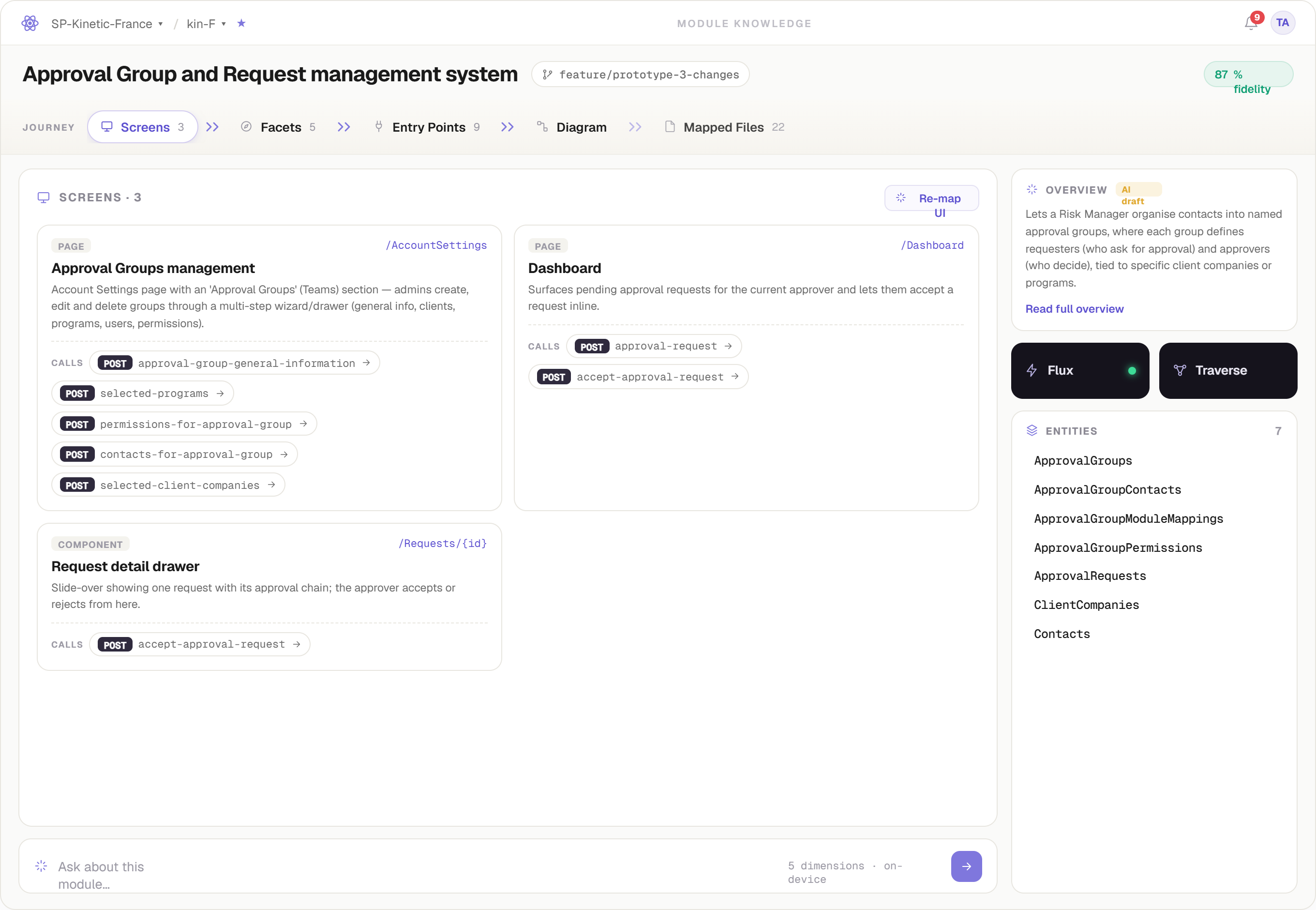
A certified module. Every fact on this screen was AI-drafted and human-approved.
Using it day to day #
Onboarding someone
Send them the module list, not the repo tour. Overview first; they drill only where their work lands.
Answering the same question again
Answer it once into the module. The next person asks the module — you stay the authority, you stop being the lookup service.
Planning a change
Open Blueprint: describe the change, let the impact probe compute what it touches, walk the scenarios, then export the brief.
Working with an agent
Let it pull a context pack for the impacted modules instead of re-explaining them each session.
Modules & table anchors #
A module is the unit of knowledge in Sphoton: a named part of your system with an owner, a status, a fidelity score, a set of facets, and a set of anchor tables. Modules are how humans talk about a system, so they are how Sphoton stores it.
Why tables anchor a module
Folder structure lies — it reflects the order things were built, not what they mean. Persistent state doesn't lie. Anchoring a module to the tables it owns and reads gives every later claim something concrete to be checked against, and makes cross-module impact computable rather than guessed.
- Owned tables — the module is the authority for this data.
- Read tables — the module depends on data another module owns.
- Ambiguous — genuinely shared. Sphoton surfaces the ambiguity and you decide; the decision is recorded.
Two ways to capture a module
Analysis shipped
Sphoton reads the code and drafts assertions for you to ratify. Best where the code is the truth.
AI interview shipped
Sphoton questions you or a teammate about the module and tracks, per dimension, what it still doesn't know. Best for intent, history and constraints the code can't state.
Assertions & evidence #
Nothing enters Sphoton as prose. Every finding is an assertion: one specific claim, a confidence score, and evidence you can open.
| Part | What it means |
|---|---|
| Claim | One checkable statement about the module — not a paragraph, not a summary. |
| Confidence | How sure the analysis is, shown to you before you decide. Low confidence is surfaced, not hidden. |
| Evidence | A file:line reference you can open inline. Evidence links re-locate as code moves so they can't rot into dead line numbers. |
| Verdict | Accepted, rejected, or untouched. Only accepted claims become knowledge. |
| Provenance | Who decided, when, and against which state of the code. |
Human confirmation outranks AI inference — permanently. A later analysis that contradicts a human verdict raises a conflict for review. It never silently overwrites you.
Gaps are first-class
When the code doesn't answer a question — no rollback path, no operational runbook, a validation hidden behind a flag — Sphoton records a gap rather than producing a plausible sentence. Gaps are visible in the module and count against fidelity.
Fidelity score #
Fidelity answers one question: how completely is this module actually understood? It is not a quality grade for your code and not a percentage of files read. It is scored across five dimensions.
- Purpose
- What the module is for, in terms a human would use.
- Data model
- The tables and entities it owns and reads, and how they relate.
- Behaviour
- What it does at runtime — flows, entry points, sequences.
- Boundaries
- Where it ends and another module begins; what crosses the line.
- Operations
- How it is run, monitored, and recovered.
Most first-pass modules land in the seventies, and Operations is usually the weak dimension — because most codebases genuinely don't state how they're operated. A low score with a flagged gap is a correct answer, not a failure. Fill it with an AI interview if the knowledge exists in someone's head.
Facets & altitude #
You don't solve a parabola to catch a ball. Knowledge is only useful at the altitude the reader needs, so every module is stored at three, each a faithful compression of the one below.
| Altitude | Contents | Typical size |
|---|---|---|
| Overview | One paragraph plus three vital signs — fidelity, tables, facets. Orients anyone in ten seconds. | ~180 tokens |
| Facets | The module's named aspects and the labelled relationships between them. | ~1.2k tokens |
| Detail | A recursive tree under each facet: prose, entry points, diagrams, gaps — as deep as the module genuinely goes. | ~9k tokens |
The facet rule
A facet is a named aspect of a module — locale publish, cache invalidation, gap tracking. A facet that cannot point to concrete evidence is rejected at write time. Diagrams are rendered deterministically from stored facts; the model never draws one.
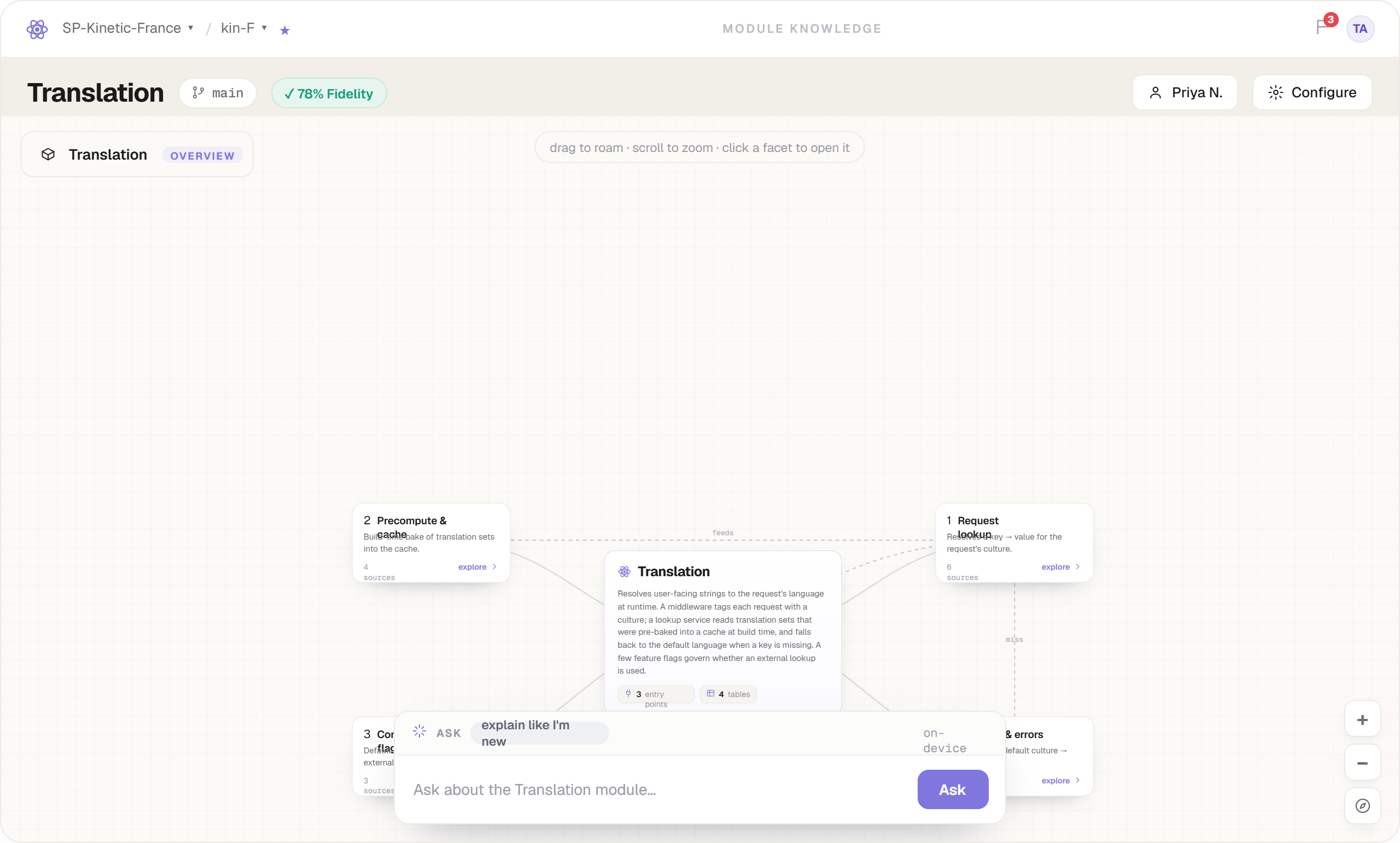
The facets altitude: named aspects and labelled relationships, rendered from stored facts.
Certification #
Certification is the moment knowledge stops being a draft. It records signatures against a specific state of the code.
- draft — the AI thinks so; nobody has confirmed it. Never treat this as truth, and no agent should build on it.
- in progress — being ratified right now.
- certified — human-signed. On Team plans this means two signatures: owner + senior engineer.
- stale — was certified, then the code moved. Still useful, no longer trusted. See drift.
- conflict — a fresh analysis contradicts a human verdict. Needs a person, not a merge.
Drift, staleness & conflicts #
Documentation rots because nothing tells it to. Sphoton is event-driven: when a change touches a certified module, that module — and everything derived from it — is marked stale until re-verified.
- You import a schema change or re-check a workspace.
- Sphoton computes which certified modules the change touches, through the table anchors.
- Those modules flip Certified → Stale immediately, and derived artifacts inherit the stale mark.
- Re-verify runs a fresh analysis: dropped tables leave, new ones arrive, unchanged facts are re-confirmed, contradictions become conflicts.
- Certified again — with a new signature and a new timestamp.
Drift detection fires on schema import and re-check — it is not a live file-watcher. A module can be true and unmarked while a branch you haven't imported already contradicts it. Where knowledge and code disagree, the code is right.
Sphota — the knowledge engine shipped #
Where modules are captured, verified and read. The loop from Your first module lives here, plus the everyday views onto it.
- Module detail — overview, facets, entry points, diagram, mapped files, entities, and the Screens map for that module.
- Ask — a repo-grounded chat that answers from certified knowledge and cites what it used. If the knowledge isn't there, it says so instead of improvising.
- FAQ — owner-curated answers promoted from real questions, so the same one isn't answered twice.
- Coverage & conflicts — what's certified, what's draft, what disagrees.
Blueprint — plan the change shipped #
For the change you can't fully specify up front. Talking is free; the artifacts are grounded.
- Describe it in conversation. Plain language, no template.
- The impact probe grounds every artifact you mention against the real module and table graph — deterministically, at zero model tokens. Impact is computed, not guessed.
- Draft the plan across Plan · Impact · Decisions · Scenarios · Proof.
- Walk scenarios over the delta flowchart, then let the AI attack the plan devil's-advocate style.
- Sign the snapshot and export an agent-ready brief. The export gate refuses until every impact row is grounded.
Sphoton never edits your repository. Blueprint makes the plan true before an agent or a person touches code.
Traverse — the data architecture shipped #
A drillable ERD where every column carries a human-verified reason to exist, with provenance and credibility on each fact, threaded comments, and team verification.
- Two viewer modes — Cards + Orbit for reading structure, Graph + Spotlight for chasing relationships.
- Database Traverse beta — connect a live SQL Server and browse its real structure. Introspection runs on your device, metadata only (catalog views, never row data); credentials are encrypted under your workspace key.
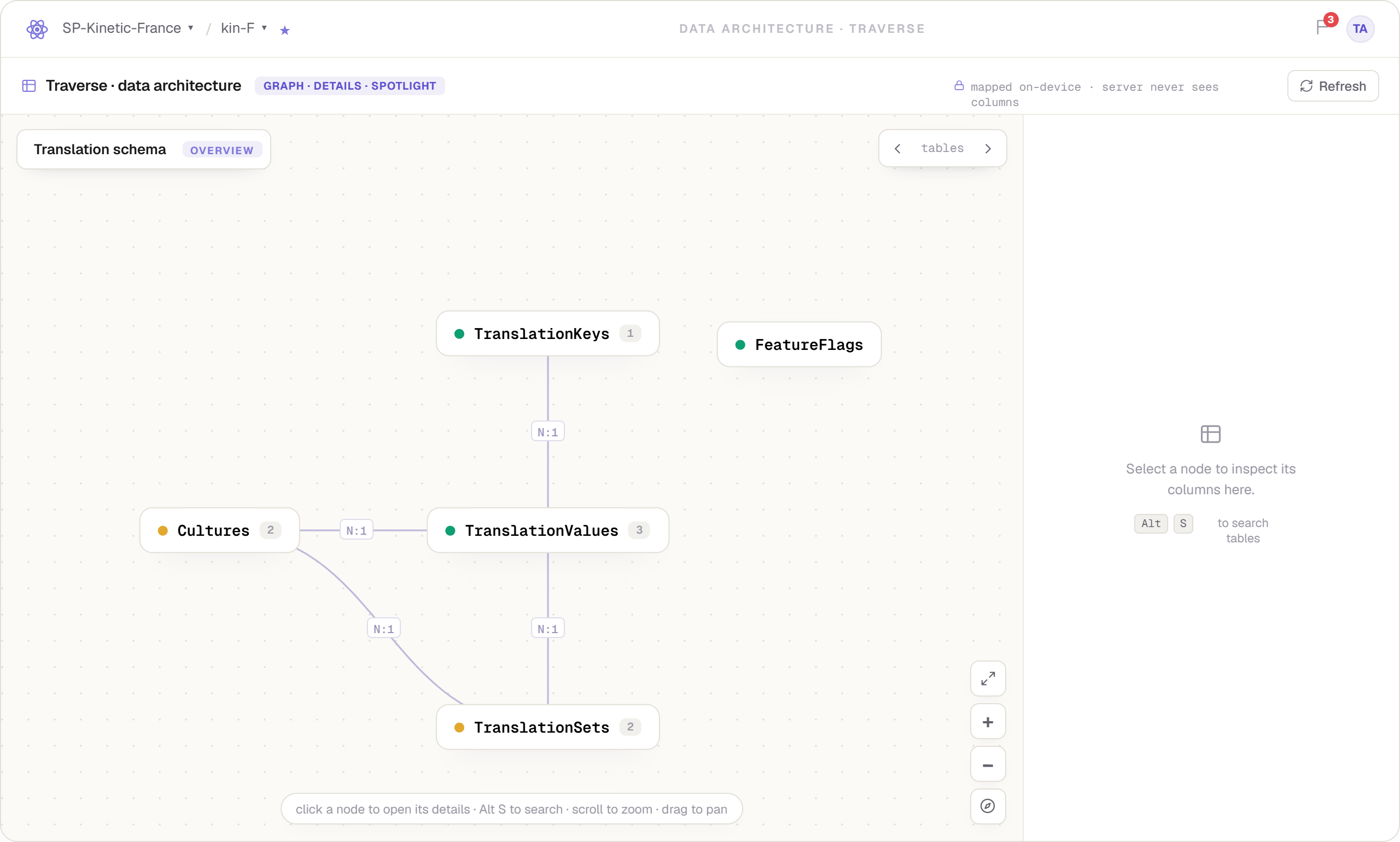
Graph + Spotlight: the schema your ORM never showed you.
Flux later #
The data-flow destination. Today it is honestly a slot in the app and a promise — it ships after live release, shaped by what beta users ask for. It's documented here because you'll see it in the app, not because you can use it yet.
Knowledge Gateway beta #
The Gateway is how machines read Sphoton. It serves the same certified knowledge as the app, shaped for a model's context window instead of a person's screen. Personal, Team and self-hosted deployments differ only in who the workspace key is shared with — see Plans.
Context packs beta #
A context pack is a bundle of module knowledge assembled for one request: a signed manifest, a mandatory trust stamp per module, and content served at the altitude that fits the budget.
# agent → context pack for one module, 4k budget
manifest  { signed: true, workspace: "kin-F", altitude: overview }

module Translation        CERTIFIED
  overview · 3 vital signs
module PrecomputeCache    CERTIFIED · STALE
  # knowledge and code disagree — the code is right
module FeatureFlags       DRAFT
  # the AI thinks so; nobody has confirmed it

# 4k reached → altitude dropped to overview. never truncated.
- The budget picks the altitude, not the truncation point. Shrink the budget and the pack drops a layer; it never hands the agent half a sentence.
- Every module arrives stamped. Certified, stale or draft — so the agent knows what it is allowed to build on.
- The manifest is signed, so a pack can be traced back to the workspace state that produced it.
MCP in Claude Code beta #
Sphoton exposes an MCP server so a coding agent can pull knowledge itself instead of being re-taught every session. Register it once with your agent; exact configuration values ship with your beta invite.
// agent config — shape only; your invite carries the real values
{
  "mcpServers": {
    "sphoton": {
      "command": "sphoton-gateway",
      "args": ["--workspace", "<your-workspace>"]
    }
  }
}
The flow it's built for
- You describe a change that touches several existing modules.
- Sphoton runs impact analysis and lists the modules it believes are affected, each with a confidence and a trust stamp.
- You can search and add a module the analyzer missed — manual selection is part of the design, not a fallback.
- The pack loads at an altitude that leaves the window free for the actual work.
- The agent designs against current, certified facts — not last week's chat.
A missed module doesn't cost one fix. It costs a second lap of Dev → QA → BA → Dev → QA, and the date you promised. Knowledge you already had, paid for twice.
Roles & permissions shipped #
| Role | Can |
|---|---|
| Owner | Everything, including membership, workspace settings, and certification signatures. |
| Senior | Ratify assertions and provide the second certification signature. |
| Developer | Capture modules, ratify assertions, comment, raise conflicts. |
| Viewer | Read certified and draft knowledge; comment. |
"Personal" visibility on an item is an access filter, not extra encryption. It hides an item from teammates in the UI; it does not encrypt it separately from the workspace.
Invites & key sharing shipped #
Adding a teammate is a cryptographic operation, not a database flag. The workspace key is wrapped to their RSA-4096 public key, and the invite shows a fingerprint you can verify out-of-band before accepting.
Workspace-key rotation when a member leaves is designed and on the roadmap. Today, removing a member revokes access server-side.
Co-editing shipped #
Two people can work a module at once. Sphoton takes live locks at the item level so you never silently overwrite a teammate's ratification, and every verdict carries its author.
Zero-knowledge model #
The encryption core was milestone one, never retrofitted. 500+ backend tests run behind it.
- Content is encrypted on your machine with
AES-256-GCMunder a per-workspace key, before anything leaves. - The server stores ciphertext it cannot read. There is no server-side decrypt path and no server-side index of your code or knowledge.
- Analysis is local. Read-only, sandboxed tools; no repository upload or mirror.
- Your AI key is yours. It lives in your OS keychain and calls Anthropic directly.
BYOK & the AI budget #
Every tier is bring-your-own-key. You add an Anthropic API key; Sphoton calls api.anthropic.com from your machine under your account, and you are billed by Anthropic directly with no markup from us.
- The key is never transmitted to Sphoton servers and never logged.
- A fair-use daily AI budget applies per tier. It is governance to keep runaway loops from draining your account — not a meter we bill you on.
- Code slices sent during analysis go to Anthropic under your key and their terms. That is the honest shape of BYOK.
Recovery keys #
At workspace creation you complete a one-time recovery-key ceremony. That key is the only way back into an account whose credentials are lost.
Zero-knowledge cuts both ways: we cannot reset what we cannot read. Lose the recovery key and the workspace is unrecoverable. Store it like a root credential — offline, and not only on the machine running Sphoton.
What we don't claim #
Each guarantee has a limit, and you should know it before you trust the guarantee.
"Nothing reaches our servers"
"Your code never leaves your machine"
"Independently audited"
api.anthropic.com, and your key sits in your OS keychain."Knowledge is always current"
"Team keys rotate on departure"
Plans #
| Tier | Price | Includes |
|---|---|---|
| Explorer | $0 forever | One repository, the full living-knowledge engine, drift flagging. Not a trial. |
| Pro | $15 / mo | Unlimited repositories, Blueprint & Traverse, personal Knowledge Gateway beta. |
| Team recommended | $30 / seat / mo | Shared knowledge under shared-key cryptography, roles, live co-editing locks, two-signature certification, Team Gateway beta. |
| Enterprise | Custom | Self-hosted Gateway, enterprise controls, guided rollout: prototype days → pilot UAT → org-wide. |
Nothing is billable yet — there is no checkout before the beta opens, and that's deliberate. Founding users keep these prices for life.
Troubleshooting #
A module I certified went stale on its own
Fidelity won't go above the seventies
The analyzer proposed a table that isn't really ours
A re-analysis contradicts something I confirmed
The agent's answers are vague or hedged
I lost my recovery key
Glossary #
- Module
- A named piece of your system, anchored to real tables — the unit of knowledge.
- Anchor table
- A table a module owns or reads; the concrete thing claims are checked against.
- Assertion
- One checkable claim with a confidence score and file:line evidence.
- Ratify
- A human accepting or rejecting an assertion. The moment inference becomes knowledge.
- Facet
- A named aspect of a module. Rejected at write time if it can't point to evidence.
- Altitude
- The depth at which knowledge is served: Overview, Facets, or Detail.
- Fidelity
- How completely a module is understood, across five dimensions.
- Gap
- A question the code doesn't answer, recorded as unknown instead of guessed.
- Certified
- Human-signed against a specific state of the code. Two signatures on Team.
- Stale
- Was certified; the code has since moved. Useful, not trusted.
- Conflict
- A fresh analysis contradicts a human verdict. Needs a person.
- Drift
- The divergence between stored knowledge and current code.
- Context pack
- Signed, stamped module knowledge assembled for one agent request.
- Impact probe
- Deterministic computation of what a change touches. Zero model tokens.
- Export gate
- The check that refuses a Blueprint export until every impact row is grounded.
- BYOK
- Bring your own key: your Anthropic key, your bill, no markup.
Status & roadmap #
| Area | Status | Notes |
|---|---|---|
| Sphota — capture, ratify, certify, layers | shipped | Analysis and AI interview, Ask with citations, FAQ, Screens map. |
| Blueprint | shipped | Impact probe, scenarios, signed snapshot, export gate. |
| Traverse | shipped | Drillable ERD, two viewer modes, team verification. |
| Database Traverse — live SQL Server | beta | On-device introspection, metadata only. |
| Knowledge Gateway & context packs | beta | Personal, Team, self-hosted. |
| MCP server for coding agents | beta | Impact analysis plus manual module selection. |
| Workspace-key rotation | later | Designed; removal revokes server-side today. |
| Flux — data flow | later | After live release, shaped by beta feedback. |
| Published third-party audit | later | Closed source today; verify the traffic yourself. |